
Training zones, flexibly set by you
Every training zone in Wyder can be anchored to something physiological, such as LT1, LT2, FTP, CSS, or heart rate, instead of being based on a single fixed metric. Anchoring zones to a real threshold is what makes a prescribed intensity mean the same physiological effort for every athlete it's assigned to, so training actually produces the adaptation you're aiming for, instead of quietly over or undershooting it.
LT1 and LT2 are both available as separate anchors, so you can set each one directly rather than approximating one from the other.
Setting zone defaults, and overriding them per athlete
Set the training zone scheme that should be used by default for every sport and athlete from Your account -> Zones. From there, or from an individual athlete's profile, you can also override that default for one specific athlete whenever their zones are defined differently, so their training stays accurate to them specifically. Before saving any scheme, preview exactly what the zones resolve to in real paces, power, or heart rate for a given athlete, so you catch a mismatch before it ever reaches their training.
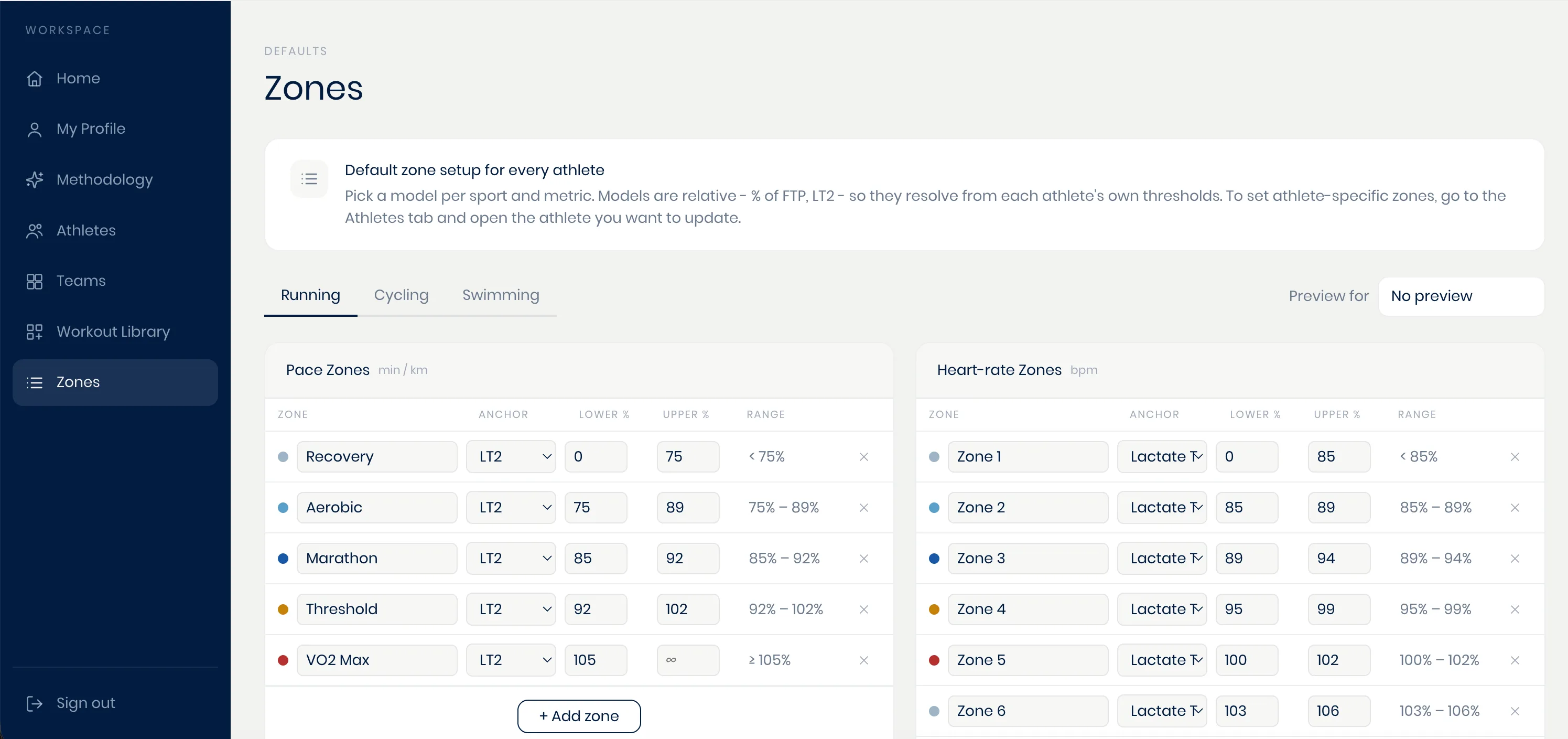
Set or adjust zones whenever it's useful, whether that's on day one or much later.
While workout templates are typically built based on intensity anchors linked to training zones, Wyder also allows you to build workouts with an intensity structure freely expressed in pace or power values. That way you don't have to bother converting zones into efforts whenever you don't want to, as covered in Building workouts.