
Your whole roster, in one grid
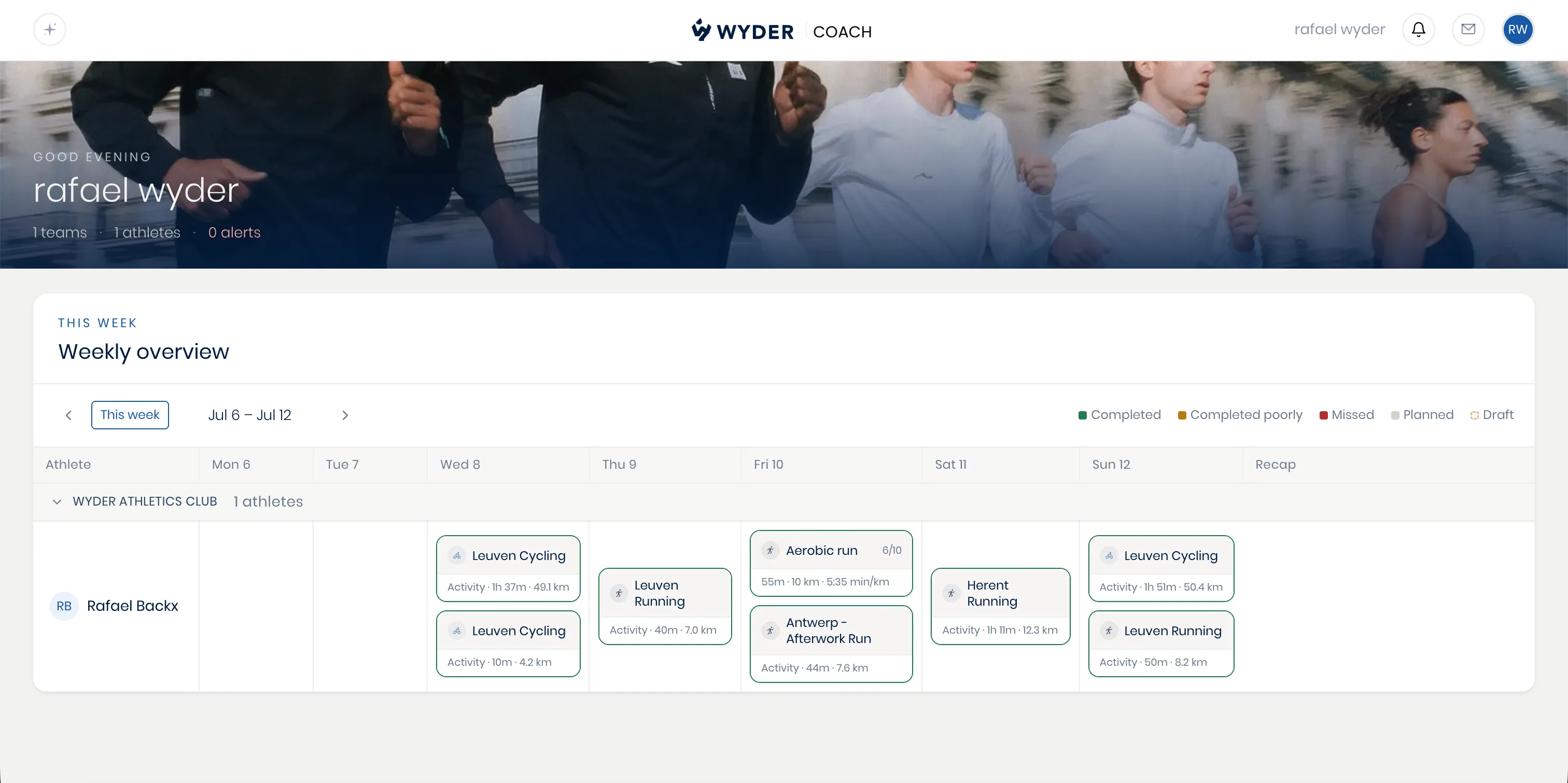
This is the view that welcomes you every time you open Wyder: a grid with your athletes as rows, grouped by team, and the days of the week as columns. Anyone not on a team yet automatically falls into a single group. Each cell shows that day's workouts, color-coded by whether it was completed, completed poorly, missed, or still just planned, so you can spot who's on track and who needs your attention across your entire roster in a matter of seconds, without needing to open a single athlete's individual page first.
Interacting with the grid
Step forward or back a week to check in on how a past week unfolded or preview what's coming up. Click any workout cell to open that session's full review, covered in Reviewing a workout, or click an athlete's name to jump straight to their full profile, covered in Athlete profiles. If your co-pilot has a recap ready, analyzing and summarizing an athlete's week and performance, you'll find it on the right of that athlete's row (see Weekly recaps).
Everything else, one click away
This page also doubles as your home base for the rest of the platform. Your personal AI co-pilot sits in the top left, ready for roster-wide questions. Your alerts open from the bell icon in the top right of the screen, flagging what needs your attention most. Messaging and your account both live there too, so you're never more than a click away from a conversation with an athlete or your own settings.